






AI agents for business · Casablanca

Your business.
An AI team.
A Mac Studio.

Magentique brings together your hardware, agents and workspace. One contact for installation, configuration and ongoing guidance.

Production-ready · Installation and ongoing support.

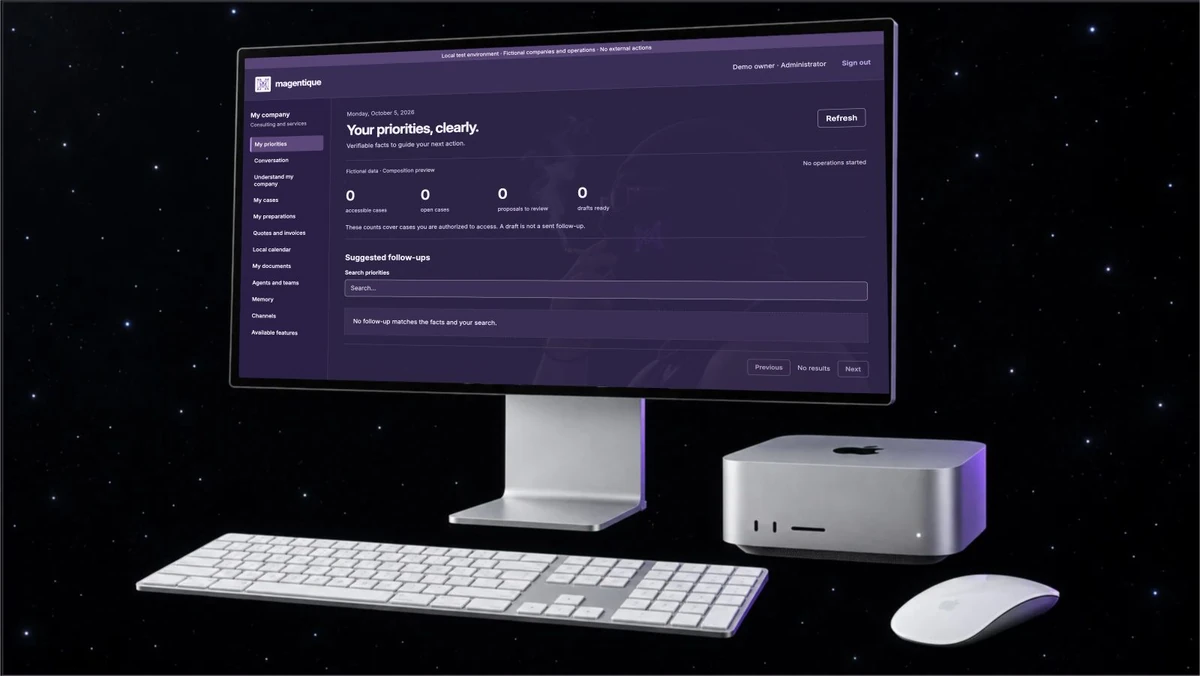
Magentique setup: priorities screen in English, Mac Studio, keyboard and mouse against a starry background. Fictional data.
Setup visual supplied by the founder, with translated presentation labels. Fictional data; the reference software version is in French. Enlarge the visual
One packageHardware, software, installation, supportYour workspaceOne environment per businessThree tiersEssential, Pro, EnterpriseOne founderMustapha Boubakri · Casablanca

What Magentique brings

AI, close to
your everyday work.

Magentique is a professional AI agent system on Mac Studio, with installation, configuration and support. The same system is also offered in the Cloud, with no machine to buy. It is intended first for leaders of small consulting and service businesses.

The cockpit brings conversations, files and agent requests together. You remain in control of approvals; features are built around specific working situations.

Understand AI agents for business

To frame your choice: local, cloud or hybrid AI (French) and an AI agent requirements template (French).

  1. 01

    Keep track of your files

    Clients, documents and next actions, brought together in one workspace.

    Documents: text import and literal search. Additional connections are scoped with you.

  2. 02

    Prepare your communications

    Organise dated drafts, review them and decide what can be used.

    Editorial calendar: drafts, versions and approval. External publishing is not connected by default.

  3. 03

    Move creative projects forward

    Structure a brief, track written version descriptions and approve proposals.

    Creative workshop: briefs and written versions. Automated control of Blender and Resolve is not included.

MST, the Magentique character, with a black balaclava and glowing violet monogram. GPT Image illustration.

Magentique

And inside,
a whole system.

Mac Studio brings the power. Magentique organises it: one orchestrator, eleven agent teams and your cockpit, designed for this machine and installed by us.

Production-ready. Features, connections and acceptance tests defined with you.

Understand the AI agent deployment

The software, in use

One thread.
On the Mac, on the iPhone.

This mockup illustrates the initial rule-based message filing with fictional data and no generated reply. These screens illustrate a historical workflow; your installation’s features and devices are defined during scoping.

On Mac Studio.

The cockpit, Conversation view: the private thread and, under each message, the team the rule chose among the eleven.

Mac screen appearance (light by default)
Mock-ups in light and dark, in the software’s art direction: they add no feature. Translated presentation labels; fictional data. The reference software version is in French.
iPhone screens appearance (light by default)
Mock-ups in light and dark, in the software’s art direction: they add no feature. Translated presentation labels; fictional data. The reference software version is in French.

On iPhone.

  • A single iPhone, the owner’s, is paired with their Mac Studio. Every request it sends is signed.
  • In this illustration, the message is filed by a rule to one of eleven teams. The thread shown does not contain a generated reply.
  • The app is not yet distributed on the App Store.

What Magentique
installs on your Mac Studio.

Magentique is production-ready. Each block specifies its scope and activation conditions.

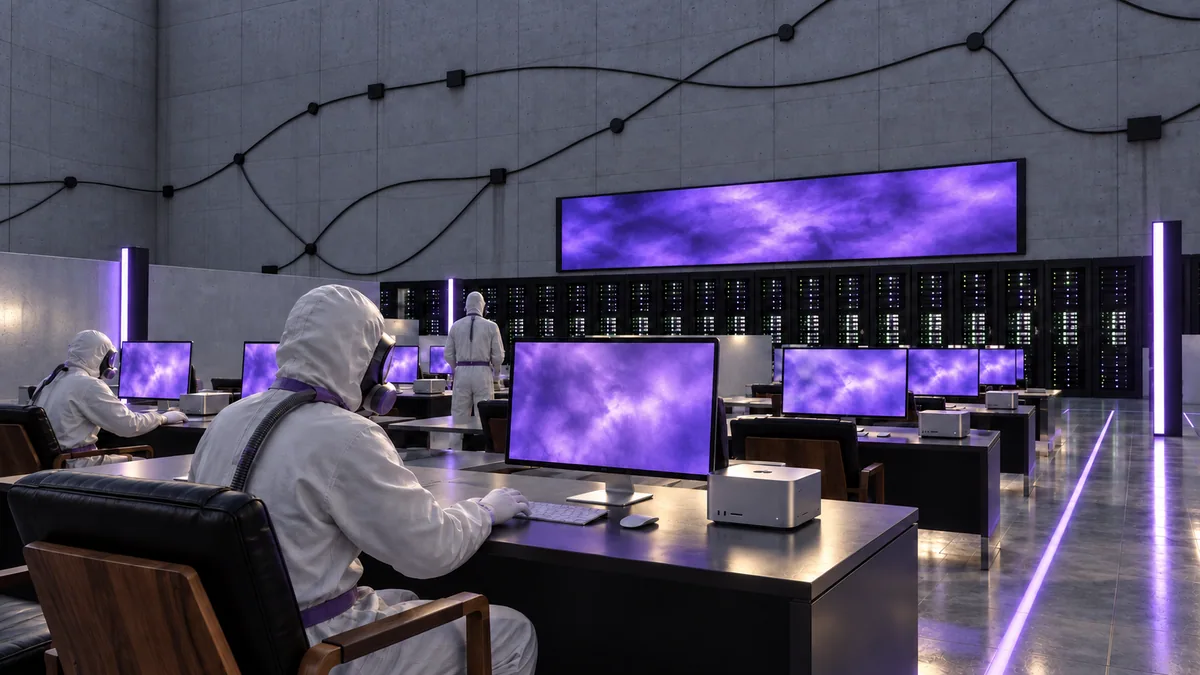
The agents’ room of the Magentique Factory: agents in white suits at Mac Studio workstations with purple screens. Interpretation generated with GPT Images.
  • Within your scope

    One orchestrator.
    Eleven teams.

    You hand over a mission; the orchestrator routes it to the right team — sales, operations, documents, web, creative studio… — and returns the result for your review.

    Tasks and tools are defined for your installation. Permissions and human approval apply to external actions.

  • Configuration

    Your priorities,
    made clear.

    Accounts, quotes, calendar, versioned documents: the cockpit brings your business together and suggests a next step, with its source and date.

    Files and priorities follow your permissions. Presentation screens use fictional data.

  • Within your scope

    Designed to stay
    on your premises.

    Your files, documents and drafts live on your Mac Studio. A remote service — a model, GPT Images, a message — only runs when you decide.

    Local processing on Mac Studio; cloud services with approval. Backups, encryption and recovery are specified at installation.

  • Configuration

    Nothing goes out
    without you.

    A quote, a message, a post: Magentique prepares, you review, and you confirm on a card showing exactly what will go out.

    Drafts and human approval. Messaging and publishing accounts are connected separately.

  • Within your scope

    Every day,
    a next step.

    Missions computed from your data, with their evidence, which you can challenge. Progress follows verified facts, not drafts.

    Tasks and supporting evidence can be reviewed. Streaks and progression levels are not included.

  • Within your scope

    Delivered. Installed.
    Looked after.

    We prepare your Mac Studio in our workshop, install it at your site, then keep it evolving. Every installation follows a plan drawn up from your first answers.

    Installation and support are available. Automatic remote update delivery and unattended recovery after shutdown are not included.

MST, a character from the Magentique world, wearing a hood with the violet monogram. GPT Image illustration.
MST is a brand character. This visual is a creation, not a photographic portrait.

Behind Magentique

One vision.
One point of contact.

Mustapha Boubakri · MstFounder of Magentique · Casablanca

Agentic Engineering & Forward Deployed Engineering

He designs Magentique’s AI agent systems and prepares their implementation with you, starting with your business. Designing agents means organising their tools, permissions and approvals. Adapting them to your business means understanding your workflows and building one useful first task with you.

Mustapha scopes integrations, agrees on validation criteria with you and prepares ongoing support. Magentique is production-ready; scope and acceptance tests are defined for your installation.

The founder and his approach

See an internally tested workflow

From your needs to your workstation

We start
with your business.

Your first discussion with Mustapha defines one useful task, your tools and the criteria for validating the result. Scope and feature status are clarified before any commitment.

Installation and support
01

Understand

Your business, workflows, data and one situation to simplify.

02

Configure

With Mustapha, scope integrations and permissions, choose a tier, delivery mode (Cloud or Mac Studio) and features to try. Hardware, external services and terms are detailed in your proposal.

03

Test and support

Evaluate the workflow against agreed criteria, keep human approvals and arrange assistance and improvements with Mustapha. Acceptance tests cover your configuration and use cases.

Entrepreneurial support

Magentique joins
UM6P Explorer.

In September 2026, the Magentique team was accepted into the Fall 2026 cohort of UM6P Explorer, an entrepreneurship programme developed in collaboration with the MIT Sandbox Innovation Fund Program.

UM6P Explorer · MIT Sandbox’s description of the collaboration

GPT Image illustration of the Media room of the Magentique Factory: a staging, not a screenshot of a delivered automation.

Artist option

For those
who create.

With every Mac Studio tier: DaVinci Resolve Studio bought for you, Blender, a space for creative briefs and reviews, and access to GPT Images on your own OpenAI account.

+ €2,990$3,410 incl. tax at installation · + €260$300 incl. tax per month

Automated control of Blender and Resolve is not included. GPT Images: OpenAI’s remote service, enabled only with your written consent; its usage is billed to you by OpenAI. Recommended hardware: confirmed when ordering.

Three tiers.
In the Cloud or on Mac Studio.

Choose the tier for what you expect from the agents, then the mode: the Cloud, with no machine to buy, or a Mac Studio delivered, installed and configured on your premises. Same software, same agents, same follow-up.

Small team

Essentiel

A first workstation for your team.

In the Cloud

€99$110 incl. tax

per month · no setup fee · 6-month commitment · in the first month, we gather your company’s context

Order in the Cloud

On Mac Studio

M5 Max · 18-core CPU, 40-core GPU · 128GB · 2TB SSD

€8,087$9,230 incl. tax

Mac Studio delivered, installed and configured

Mac at Apple public price: €6,739$7,690 · setup (20%): €1,348$1,540

€50$60 incl. tax

per month · maintenance, updates and new versions included · 2-month commitment

Installation planned in 4 days · backup API up to $20 per month

Order on Mac Studio

5 accounts · about 1,000 customer conversations per month · not contractual

Shared work

Pro

More room for your projects.

In the Cloud

€319$360 incl. tax

per month · no setup fee · 6-month commitment · in the first month, we gather your company’s context

Order in the Cloud

On Mac Studio

M5 Ultra · 30-core CPU, 64-core GPU · 256GB · 4TB SSD

€15,179$17,320 incl. tax

Mac Studio delivered, installed and configured

Mac at Apple public price: €12,649$14,434 · setup (20%): €2,530$2,886

€100$110 incl. tax

per month · maintenance, updates and new versions included · 2-month commitment

Installation planned in 7 days · backup API up to $50 per month

Order on Mac Studio

20 accounts · about 5,000 customer conversations per month · not contractual

Several departments

Entreprise

A foundation for several teams.

In the Cloud

€1,049$1,200 incl. tax

per month · no setup fee · 6-month commitment · in the first month, we gather your company’s context

Order in the Cloud

On Mac Studio

M5 Ultra · 36-core CPU, 80-core GPU · 512GB · 8TB SSD

Price to come

Apple opens orders for the 512GB memory at the end of October 2026: the Apple price + 20% is confirmed to you then.

€250$290 incl. tax

per month · maintenance, updates and new versions included · 2-month commitment

Installation planned in 12 days · backup API up to $150 per month

Order on Mac Studio

50 accounts · about 20,000 customer conversations per month · not contractual

Artist option, with every Mac Studio tier: + €2,990$3,410 incl. tax at setup, + €260$300 incl. tax per month. Discover the Artist option

Cloud or Mac Studio?

Same software, same agents, same follow-up. Only where it runs changes.

To compareCloudMac Studio
Where it runsA machine rented by Magentique, reserved for your companyA Mac Studio installed on your premises
IntelligenceAPI only: DeepSeek V4.1 Flash by default, V4 Pro when the task needs itModels installed on the machine; a remote service only with your consent
Sensitive data (health, legal, finance)Not processed: handed to a person. DeepSeek’s servers are located in China.Processed on site, never leaving your premises
At the startNo setup fee; in the first month, we gather your company’s contextThe Mac at Apple public price + 20% setup, paid once
VolumesMonthly conversation cap, alert at 80%Guidelines, no cut-off
Commitment6 months2 months

You can start in the Cloud and move to a Mac Studio later, keeping your agents and history. The Artist option requires the Mac Studio.

Why DeepSeek and Mac Studio? Comparison with their direct competitors (in French)A need beyond the tiers? Custom projects (in French)

Prices including tax, set in euros by Magentique SARL AU; in US dollars, equivalents at the ECB reference rate of September 23, 2026 (€1 = $1.1411), rounded to the nearest ten. The pro forma invoice prevails. Apple France public price incl. tax, read on apple.com on October 11, 2026; recalculated in the quotation.

Before we talk

Your first
questions.

Is Magentique ready for my business?

Yes. Magentique is production-ready, in the Cloud or on Mac Studio. Together, we define included features, integrations, permissions and acceptance tests for your installation. See installation scope and conditions.

Does my data stay on the Mac?

In the Cloud, responses use the DeepSeek API and sensitive data (health, legal, financial) is not processed: it is reserved for Mac Studio, where the project prioritises local processing. Connections, relevant data and external costs must be scoped before activation.

What budget should I plan?

In the Cloud: a subscription alone, starting at €99 including tax per month, with no setup charge. On Mac Studio: one configuration per tier, at Apple’s public price plus 20% for setup, starting at €8,087 including tax, then maintenance starting at €50 including tax per month. The three tiers and Artist option are detailed on the tax-inclusive pricing page.

Where do you aim to support businesses?

Magentique is based in Casablanca. Target markets are Morocco, France, Belgium, Luxembourg, Switzerland and Canada. On-site or remote delivery, hardware and timelines are confirmed for each project.

Your next chapter

Let’s start with
a task that matters.

Tell us what you do and what you would like to simplify. Together, we will define the right starting point.

Setup visual supplied by the founder. MST and agent-room illustrations: GPT Image creations from the Magentique world. Images and presentation screens are not evidence of a customer installation. Apple and Mac Studio are trademarks of Apple Inc.